– No frequency hop pattern.
-
Hop Start = 0 Hz
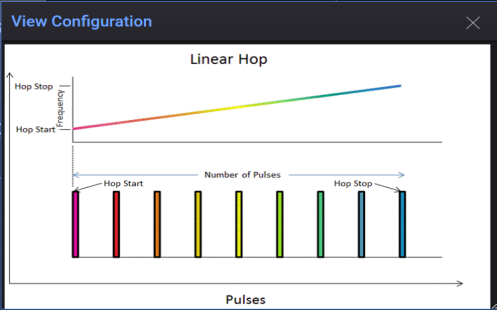
 Linear Ramp – Creates a linearly increasing or decreasing frequency hop pattern. You specify Hop Start, Hop Stop, and the number of pulses in the pattern. The number of repeats specifies the total number of hops generated. This allows partial and multiple repetitions of the pattern to be generated.
The following properties are used with this type:
-
Hop Start (Default = -2 MHz)
-
Hop Stop (Default = 2 MHz)
-
Number of Pulses (Default = 5)
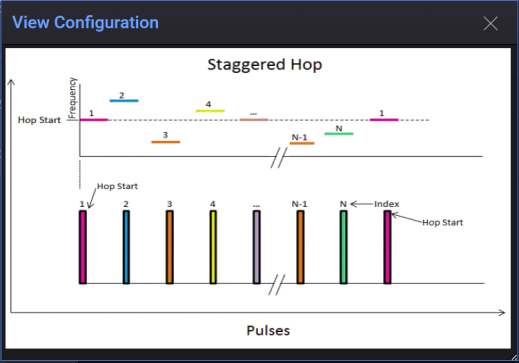
Staggered – Create a user defined frequency hop pattern by entering 1 to n hop items. The hop pattern values can also be imported from a file. See Import. The number of repeats specifies the total number of pulses generated. This allows partial and multiple repetitions of the pattern to be generated.
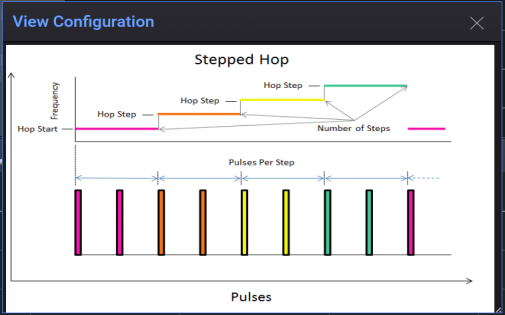
Stepped – Creates a stepped frequency hop Pattern. You specify the Hop Start, the Hop Step size, the number of pulses per step, and the number of steps in the pattern. The total number of pulses in the pattern is calculated by multiplying the number of steps times pulses per step. The number of repeats specifies the total number of pulses generated. This allows partial and multiple repetitions of the pattern to be generated.
The following properties are used with this type:
-
Hop Start (Default = -2 MHz)
-
Hop Stop (Default = 1 MHz)
-
Number of Steps (Default = 4)
-
Pulses Per Step (Default = 1)